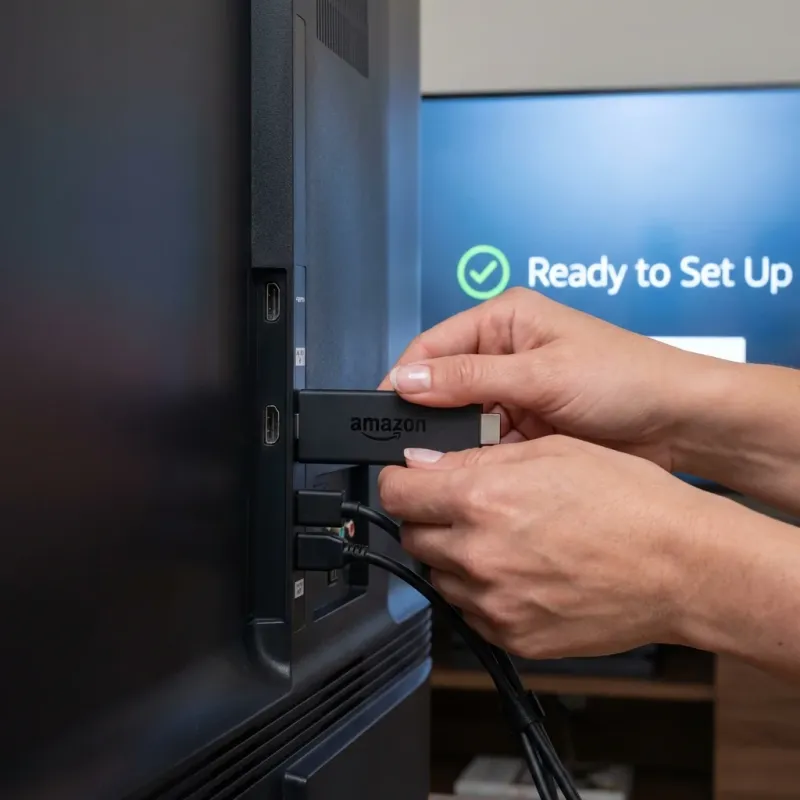
Why Firestick is the Best Device for IPTV
Amazon Firestick is the most popular device for IPTV streaming, and for good reason. It's affordable, powerful, and supports all major IPTV apps. With a Firestick, you get: • Access to TiviMate, IPTV Smarters, and other premium apps • 4K HDR streaming capability (on 4K models) • Voice control with Alexa • Portable design - take it anywhere This guide works for all Fire TV devices including Fire TV Stick Lite, Fire TV Stick (3rd Gen), Fire TV Stick 4K, Fire TV Stick 4K Max, and Fire TV Cube.
What You'll Need
Amazon Firestick
Any model: Lite, 4K, 4K Max, or Cube
IPTV Subscription
Your login credentials (username, password, server URL)
Internet Connection
15+ Mbps for HD, 25+ Mbps for 4K streaming
5 Minutes
That's all the time you need!
Step 1: Enable Apps from Unknown Sources
Before installing IPTV apps, you need to allow your Firestick to install apps from outside the Amazon App Store. This is safe and easy to reverse.
From the Firestick home screen, go to Settings (gear icon)
💡 Hold the Home button and select Settings, or navigate to the top menu
Select My Fire TV (or Device on older models)
Choose Developer Options
💡 If you don't see this, select 'About' and click 'Fire TV Stick' 7 times to unlock it
Turn on Install unknown apps or Apps from Unknown Sources
💡 On newer Firesticks, you'll enable this per-app later
⚠️ This setting only allows you to install apps manually. It doesn't make your device less secure. You're in full control of what gets installed.
Step 2: Install the Downloader App
Downloader is a free app that lets you install IPTV apps from the web. It's available directly in the Amazon App Store.
Go to Search (magnifying glass icon) on your Firestick
💡 You can also say 'Alexa, search for Downloader'
Type Downloader and select the orange app by AFTVnews
💡 Make sure it's the official one with the orange icon
Click Get or Download to install
Open Downloader and allow any permission prompts
💡 Grant all permissions for the app to work properly
Step 3: Install Your IPTV App
Now you'll use Downloader to install your preferred IPTV player. We cover the two most popular options below.
IPTV Smarters Pro
RecommendedBest for beginners. Free version available with easy setup.
Downloader Code: 647582- 1. Open the Downloader app
- 2. In the URL field, enter: 647582 (or the full URL above)
- 3. Click Go - the APK will download
- 4. When prompted, click Install
- 5. After installation, click Done to return to Downloader
- 6. Click Delete to remove the APK file and save space
TiviMate
Best premium experience. Multi-view, recording, and catch-up TV.
Downloader Code: 143724- 1. Open the Downloader app
- 2. Enter URL: Search 'TiviMate' in Amazon App Store (free version)
- 3. Or use Downloader with premium APK for full features
- 4. Install and open TiviMate
- 5. TiviMate Companion app is needed for premium activation
Step 4: Add Your IPTV Subscription
Now connect your LUNOTV subscription to start watching. You'll use the Xtream Codes method (most common).
Xtream Codes API (Recommended)
The easiest method. Uses your username, password, and server URL.
- 1. Open IPTV Smarters Pro (or your chosen app)
- 2. Select Add User or Add Playlist
- 3. Choose Xtream Codes API
- 4. Enter the following from your welcome email:
- 5. • Name: Any name (e.g., LUNOTV)
- 6. • Username: Your IPTV username
- 7. • Password: Your IPTV password
- 8. • URL: Your server URL (starts with http://)
- 9. Click Add User - channels will load automatically
💡 Your credentials were sent to your email after purchase. Check spam if you can't find them.
M3U Playlist URL
Alternative method using a single URL. Good for apps that don't support Xtream Codes.
- 1. Open your IPTV app
- 2. Select Add Playlist or M3U URL
- 3. Paste your M3U URL from the welcome email
- 4. Click Load or Add
- 5. Wait for channels to load (this may take 1-2 minutes)
💡 M3U playlists are larger files. Initial loading takes longer but works on all devices.
Step 5: Optimize Your Experience
Get the best streaming quality with these recommended settings.
Use an Ethernet Adapter
WiFi is convenient, but an Ethernet adapter provides faster, more stable streaming. The Amazon Ethernet Adapter for Fire TV is only $15.
Clear Cache Weekly
Go to Settings > Applications > Manage Installed Applications > [Your IPTV App] > Clear Cache. Prevents buffering issues.
Enable Hardware Decoding
In IPTV Smarters: Settings > Player > Enable Hardware Decoder. Uses the Firestick's GPU for smoother playback.
Consider a VPN
Using a VPN like Surfshark or ExpressVPN can prevent ISP throttling and improve speeds in some cases.
Troubleshooting Common Issues
❓ "Cannot install app" or "App not installed" error
✅ Make sure 'Install unknown apps' is enabled for the Downloader app specifically. Go to Settings > My Fire TV > Developer Options > Install unknown apps > Downloader > ON.
❓ Channels not loading or "Authentication Failed"
✅ Double-check your username, password, and server URL. Make sure there are no extra spaces. Try copying credentials directly from your email.
❓ Buffering or freezing
✅ Restart your router and Firestick. Use a wired connection if possible. Try a VPN to bypass ISP throttling. Lower video quality in app settings.
❓ No audio or out of sync audio
✅ Change the player in your IPTV app settings. In IPTV Smarters: Settings > Player > try VLC or ExoPlayer. Some channels work better with different players.
❓ App crashes or freezes
✅ Clear the app cache and data. If issues persist, uninstall and reinstall the app. Make sure your Firestick firmware is updated.
Frequently Asked Questions
Do I need to jailbreak my Firestick?
No! You don't need to jailbreak anything. You simply enable 'Apps from Unknown Sources' which is a built-in Amazon feature. It's completely safe and reversible.
Is this legal?
Installing apps on your Firestick is legal. The legality depends on the IPTV service content itself. LUNOTV operates within legal guidelines for content distribution.
Will this void my Firestick warranty?
No. Enabling unknown sources is an official Amazon feature and does not affect your warranty.
Which Firestick model is best for IPTV?
Fire TV Stick 4K Max offers the best performance with faster WiFi 6 and more RAM. However, all models work great for IPTV. Even the Lite model handles HD streams perfectly.
Can I use this on multiple Firesticks?
Yes! Based on your subscription plan (1-4 screens), you can install the app on multiple devices. You can install on unlimited devices, but only stream simultaneously on your plan's screen limit.